Vouchers, promotions
Discount vouchers
How do I redeem a voucher code?
Simply enter your voucher code in the "Redeem voucher" field in the shopping cart. The discount will then be deducted automatically.
My voucher was not accepted, why is that?
Please note that our vouchers are usually subject to conditions. This may be a certain minimum purchase value or the voucher is only valid within a certain period. Our vouchers cannot be offset against gift vouchers and are not valid on books. Furthermore, excludes the following brands or collections from vouchers : Bolia, ClassiCon, Emu, Fermob, Fiam, Foscarini, Grythyttan Stålmöbler, Höfats, HOUE, Jacob Jensen, Jan Kurtz, Kartell, Louis Poulsen, Moooi, Nardi, Nanimarquina, Pedestal, Stapelstein®, Smeg, String Furniture, Thonet, Vitra, Zuiver.
The voucher may not be published or used commercially in any other way. Please also note that we will only ever redeem a maximum of one voucher. It is therefore not possible to enter several voucher codes or to offset vouchers with other discounts. The voucher can only be redeemed once per customer. Cash payment of the voucher value is also not possible.
Vouchers can only be redeemed in connection with an order. Subsequent crediting, e.g. to an invoice amount, is not possible. All vouchers are also valid after deduction of the return, i.e. if the above-mentioned conditions for a return (e.g. minimum purchase value) no longer apply after a return, the voucher is also invalid. The voucher may not be published or used commercially in any other way. Legal recourse is excluded.
Promotional items can be found, for example, at our offers and in our Design Sale . Here you can save money and get bargains.
Special offers
Promotional items and special offers refer to regular products from our range. The items can be placed in the shopping cart like any other product and then purchased.
Free articles are articles that are advertised in a newsletter or on partner sites on the Internet. These are marked with a price of 0.00 Euro and are usually limited to a certain number of items. Free items are usually linked to a certain purchase value.
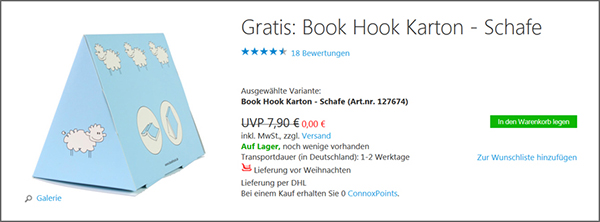
How do I add a free item to my order?
If the corresponding free item is still available, it can be added to the shopping cart like a "normal" purchased item by clicking on the shopping cart symbol. If the shopping cart symbol is no longer displayed and there is a corresponding note "no longer available", the item is unfortunately already out of stock.
If you have selected a free item that is linked to a voucher, it is no longer possible to add it to other vouchers.
Do you want to give someone a special gift but don't know what to give them? With our gift vouchers you're always on the right track, because good design always comes from the heart.
The value of the gift voucher can be selected in several steps from €20 to €200. The gift voucher will be sent to you as an attractive PDF, which will also be a visual delight for the recipient. The image contains a voucher code, which can simply be entered in the shopping cart as with any other voucher.
What else is important to know?
Discount vouchers are not taken into account when ordering gift vouchers. ConnoxPoints are not awarded for the purchase of gift vouchers.
As a rule, the voucher will be sent to you automatically by e-mail directly after the order has been placed. If this is not possible in special cases, processing and dispatch will take place during business hours from Mon. to Fri., 08:00 to 18:00. Our gift vouchers are valid for three years.
If the value of the voucher exceeds the value of the goods, i.e. if there is a remaining balance, this will be transferred to a new voucher code. We will send you the new voucher with the invoice.